Shatter your signal into frequency bands and run any plugin inside each one.
The Interface
Split your sound into frequency bands and run any plugin inside each one — saturators, compressors, reverbs, your whole collection, made multiband.
Runs As VST3 / AU In
01 — Split
Carve the signal into frequency bands with flexible crossovers and 12 / 24 / 48 / 96 dB/oct slopes. Drag a divider, place it anywhere, and shape exactly how the spectrum breaks apart.
Place crossover points anywhere across the spectrum and drag them live. Add or remove bands on the fly, from a single split to a full eight-way carve, with every edge snapping cleanly to your signal.
Choose 12, 24, 48 or 96 dB/oct per crossover. Gentle slopes for natural, overlapping blends; steep slopes when you need a hard, surgical separation between adjacent bands with minimal bleed.
Run the crossovers as zero-latency IIR for live tracking, or switch to true linear-phase for mixing and mastering. Either way the bands sum back to the input cleanly — splitting never costs you the original tone.
Run anything from a simple two-way to a full eight-way split. Each new crossover spawns a fresh band with its own rack, solo, mute and gain — scale the carve to exactly what the source needs.
02 — Host
Drop any VST3 or AU into any band. Distort the lows, shimmer the highs, leave the mids untouched, all inside a single instance. Your whole effects collection becomes multiband.
Shard hosts your existing plugins. Any VST3 or Audio Unit you already own can be loaded into a band — saturators, reverbs, modulators, third-party processors — all running directly inside the band signal path.
Each band holds its own rack of plugins in series. Stack a compressor into an EQ into a saturator on the lows while the highs get a wholly different chain, all from one instance on the track.
Plugins with lookahead or oversampling report their latency, and Shard aligns every band so they stay time-locked. No phasing, no smearing — bands recombine exactly in sync regardless of internal delay.
Every guest plugin opens its own native editor right inside Shard. Tweak the hosted reverb or compressor exactly as you would on its own track — full controls, no compromise, all in one window.
03 — See
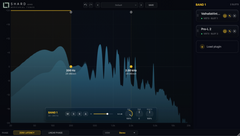
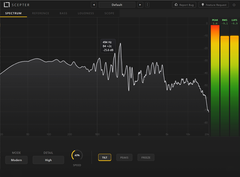
A built-in stereo-field spectrum shows exactly what each band is doing. Switch between Stereo, Mid/Side, Left/Right and Width views to read your sound the way you need to.
One analyzer, four perspectives. Flip between Stereo, Mid/Side and Left/Right to see how energy is distributed across the field, then jump to Width to read correlation directly above and below the line.
A smooth, high-resolution spectrum updates live as audio plays, drawn straight behind the band layout. Crossover points sit right on top so you can see precisely where each split lands.
The Width view derives correlation from the complex L/R spectrum — green above the line for wide content, red below for anything heading toward mono. Catch phase problems before they reach the mix.
Drag a crossover and watch it move on the spectrum in real time. Every divider sits on the analyzer with its frequency labelled, so the split always lands exactly where the energy lives.
04 — FX
Every band is an independent effect chain with its own solo, mute and gain. Tune each one in isolation, then let Shard reassemble the whole signal cleanly back into one output.
Solo a band to hear it alone, mute it to drop it from the sum, and trim its gain to balance the rebuild. Dial in each frequency region in isolation, then bring the full picture back together.
Bands never interfere with each other. Each runs its own plugin rack and routing in parallel, so heavy processing on the lows leaves the airy highs completely untouched and pristine.
After all the per-band work, Shard sums the bands back with matched phase and gain. The result feels like one cohesive processor, not separate signals stitched together — seamless, transparent, mix-ready.
Save a whole multiband setup — splits, racks, per-band gain and routing — as one preset. Recall a finished chain instantly on the next track and keep your workflow moving without rebuilding.
Technical
System Requirements Windows 10 64-bit or macOS 11 or later · AVX2 CPU (Intel 2013+ / AMD Ryzen 2017+), Apple Silicon native · 8 GB RAM
Launch Discount
€39,00€29,00
One-time · Free updates