Mercurial Tones

Scepter

Ultimate Referencing & Analysis Workstation

Explore

The Interface

Six specialized views for spectral analysis, reference matching, bass monitoring, oscilloscope, loudness metering, and stereo imaging — in one plugin. Plus Reference Capture for anything playing on your computer.

Works With Your DAW

Ableton
Logic
FL Studio
Reaper
Bitwig
Cubase

01 · New

Reference Capture

Reference anything you can hear. Capture the music playing on your computer — a streaming track, a video, a DJ set — and turn it into a reference target in seconds. No routing, no DAW sidechain.

Listen to Your System

Captures your computer’s playback output directly. Press Capture, play the track, and Scepter’s Reference Capture app does the rest.

Tone + Loudness Targets

Saves the averaged spectrum and, if you want, the track’s LUFS — so you can match tonal balance and loudness together.

One-Click Recall

Captures appear in Scepter’s Reference menu. A capture preset loads the reference and its loudness target in one go, without touching the rest of your setup.

Your Own Library

Preview, rename, and delete captures in a built-in library. Scepter stores analysis targets only — no audio is recorded.

02

Spectrum

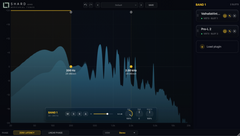
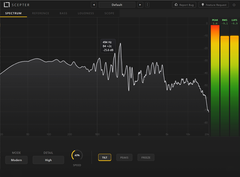
See your mix like never before. Fluid, real-time spectral analysis designed for the way modern producers actually work.

Fluid Motion

Buttery-smooth spectrum visualization that moves with your music. No stutter, no lag — just clarity.

Mid/Side Imaging

Instantly reveal what's in the center and what's in the sides. Stereo problems become obvious.

Adaptive View

Intelligent slope correction gives you a flat, intuitive reading — so you mix with your eyes as confidently as your ears.

Precision Readout

Hover anywhere for instant frequency, level, and musical note. Every detail, one glance.

03

Reference

A completely new way to reference. Match any track's frequency balance, stereo image, and dynamics — all in real time.

Instant Matching

Load any reference track or route live audio. Loudness is automatically aligned so you're always comparing tone, not volume.

Spectral Diff

A dedicated difference view highlights the exact frequencies where your mix sits above or below the reference — a clear map of what needs attention.

Stereo Field Compare

See exactly how your stereo image stacks up against your reference across the full spectrum.

4-Band Dynamics

Per-band compression comparison reveals where your mix is over-processed — or not processed enough.

04

Bass Envelope

Built for low end. Tempo-synced bass monitoring that shows you exactly what's happening below 250 Hz.

Tempo-Locked

Perfectly synced to your DAW. Watch your kick and sub unfold beat by beat.

Bass Spectrogram

A living heat map of your low end. See sub energy, harmonics, and movement over time.

Phase Monitoring

Know your low end is mono-compatible before it hits the club system.

Sub Weight

Visual breakdown of where your bass energy sits. Instantly compare against any reference.

05

Loudness

Master with total confidence. See exactly what's eating your loudness — and fix it.

Tri-Band Coloring

A first-of-its-kind color-coded loudness view. See low, mid, and high energy at a glance — nothing like it exists.

Genre Targets and modular meters

Techno, hip-hop, pop, ambient — built-in loudness profiles for the genres you actually make. Modular meters let you build your own metering layout.

Loudness Breakdown

Instantly see which frequencies are eating your headroom. Stop guessing, start fixing.

Integrated LUFS and True-Peak

Broadcast-standard metering with real-time history. Master to any target with precision with True-Peak enabled.

06

Oscilloscope

Two modes, one mission. Classic waveform view with sidechain comparison, and a spectral mode that splits your signal into three bands.

Classic View

Clean, precise waveform display. See transients, phase, and stereo movement in real time.

Sidechain Compare

Route a second signal and overlay it on your waveform. Instantly compare shapes and timing.

Spectral Mode

Splits your waveform into low, mid, and high bands. See exactly which frequencies drive each transient.

Tri-Band Waveform

Color-coded frequency separation on the scope. A view that no other oscilloscope offers.

07

Imager

A folded mid/side vectorscope with phosphor persistence. See your stereo field in real time, catch mono compatibility issues before they reach the listener.

Polar Vectorscope

Folded mid/side display with phosphor persistence. The stereo image rendered as a living, breathing shape.

Correlation Meter

Real-time stereo correlation from -1 to +1. Instantly spot phase issues and mono compatibility problems.

L/R Balance

Energy distribution between left and right channels. See if your mix leans before your listeners do.

Frequency Filtering

HP and LP filters for frequency-specific stereo inspection. Isolate how your low end or top end sits in the field.

What’s New in Scepter 1.7

The Full Walkthrough

From producers

The Pro Q of analyzers.

Unedited comments from producers on YouTube, Instagram and Reddit. Follow any link to read the original.

Best plugin I've found for referencing is scepter from mercurial tones. They did a really good job with that.
Level matching the reference(s) is key. Scepter does that, lots of different metering as well.
haux_hauxReddit ↗
Alice made an AMAZING plugin. This is better than most of the other ones I have. Mini meters when producing and then this when I do mix & mastering
@MikkelethorComment on White Sea Studio ↗
This is definitely the most comprehensive and useful end of chain tools - also runs super smooth 👏 definitely going to upgrade
@okubimusicInstagram comment ↗
This tool is made with the mind of a very seasoned techno producer and it already made my life way easier. This tool has it all.
@GelenkbusfahrerComment on White Sea Studio ↗
I’ve been using lite and it’s amazing. But think finally time to upgrade!
@patloveshondasInstagram comment ↗
This analyzer is definitely geared toward EDM and it works amazingly well. The purpose of the bass analyzer is so you can identify if you're getting either constructive or destructive interference with your bass and kick. It really helps with dialing in your sidechain ducking a breeze. The workflow is highly efficient. I purchased it with my own money btw!
@CemeterySoulsMusicComment on White Sea Studio ↗
This has set a new standard.
I own every analyser under the sun, but none of them are as finely tuned as this one.
@dorianbloomYouTube comment ↗
This is the Pro Q of analyzers. Wont need anything else.
@Jonas-jq5xlYouTube comment ↗
being able to see exactly what your plugins are doing is something I have wanted for so long, no more snake oil just real time visuals
@JonoBlanshardYouTube comment ↗
I bought it yesterday and spent already hours with it, comparing to a number of analysers.
Simplicity combined with options and always just a click away from precise listening of what You inspect, perfect!
@LarsBrandstäterYouTube comment ↗
This is a really amazing plugin, more like 10 different plugins in one (some of them didn't even exist before).
@KulíšekYouTube comment ↗
Bought the pro version yesterday, very impressed with all of it!
@JrelYouTube comment ↗
This is literally everything I needed. Took it for a spin already and omg THANK YOU 🥺
@yohan.aifInstagram comment ↗
Love your plugins! ❤️🔥 so simple and intuitive to use.
@tuanfluenceInstagram comment ↗
Got mine and it’s already in my flow 👏🔥
@mell.patronInstagram comment ↗
Game changer 👏👏
@archangel28musicInstagram comment ↗
Plugin of the year🔥
@christianbiend4458YouTube comment ↗
Instant buy. I promised myself not to buy plugins anymore, because I have everything already. But this one really adds a lot, I love every single feature.
@TheDurden-l7oYouTube comment ↗
I've been waiting 10 years for a plugin like this. Perfect.❤️
@Acid_SystemsYouTube comment ↗
This is what happens when an artist with a true passion for creating music creates a plugin!
@INNERMONO_YouTube comment ↗
So, soooooo much good stuff for this price; but mostly love the convenience not having to alternate between different (reference) plugins and analyzers.
@LiftwithLarsYouTube comment ↗
I'll definitely buy it; I've been looking for something like this for years, and the price seems very fair.
@natanezeYouTube comment ↗

Technical

0
Analysis Modes
0
Max Sample Rate
0
Latency
Fluid Motion™
Rendering Engine
Formats VST3 · AU
Platforms macOS · Windows
Sample Rate Up to 192kHz
Latency Zero
Sidechain Supported
Reference Capture System audio · Windows 10+ · macOS 14.2+
UI GPU-accelerated Native

System Requirements Windows 10 64-bit or macOS 11 or later · 64-bit Intel/AMD or Apple Silicon · 8 GB RAM

Two ways to get Scepter

One-timeOwn Scepter

Scepter, yours to keep

One payment, every update.

Launch Discount

€89,00€59,00

One-time · Free updates

or try free for 7 days

Or every plugin

The Membership

Scepter and every other Mercurial Tones plugin in your sessions, every update, every new release — plus 100 credits every month.
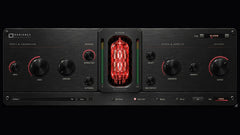
  • Radiance
  • Shard
  • Aegis
  • Tether
  • Yasha
  • Janggo Pro
  • Manta
  • Vanguard
  • Scepter
€11,99/mo, billed yearly

or €14,99 month to month
Worth €609,80 a year bought separately

See the Membership →