Mercurial Tones

Manta

Advanced Delay Workstation

or try free for 7 days

Explore

The Interface

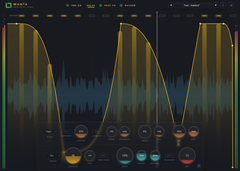
Nine delay modes. Spectral ducking. A full post-FX studio. Not just another delay plugin, a complete delay workstation built from the ground up.

Works With Your DAW

Ableton
Logic
FL Studio
Reaper
Bitwig
Cubase

Video Walkthrough

See Manta in action

Explore Manta’s delay modes, shape each repeat, and hear how ducking and post effects turn echoes into part of the arrangement.

01 — Delay Engine

Nine Modes. One Engine.

From pristine digital repeats to granular clouds, tape degradation, and recursive fractal patterns. Every mode is a different instrument. Switch in real time, sync to your tempo, and shape each repeat with per-tap envelopes.

Clean & Tape

Crystal-clear digital repeats or analog tape with saturation, hiss, print-through, and bias modeling. From studio-clean to worn-out cassette.

BBD & Lo-Fi

Bucket-brigade emulation with clock noise and compander dynamics. Lo-Fi mode adds bit-crushing and sample rate reduction for destroyed textures.

Granular & Reverse

Clouds-class granular engine with grain size, density, pitch, spray, and freeze. Reverse mode flips playback with smooth crossfades for backward textures.

Fractal, Bloom & Shards

Recursive tap trees that branch and scatter. Frozen reverb snapshots that shatter into grains. Delay modes that no other plugin has.

Hear the Difference

0:00 / 0:00
or hold W to compare

02 — Spectral Ducking

Delay That Listens

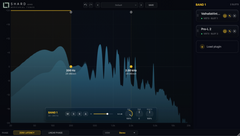
Most delays fight your dry signal. Manta's spectral ducker analyzes your input across 8 frequency bands and ducks the wet signal only where it conflicts. The delay sits perfectly in the mix without you touching a fader.

8-Band Spectral

Not a simple volume ducker. Eight independent frequency bands analyze your dry signal and sculpt the wet signal in real time, so delays never mask the source.

Volume Mode

Classic envelope-follower ducking when you want simpler behavior. Smooth attack and release controls for traditional sidechain-style delay taming.

Set It and Forget It

Dial in threshold, depth, and speed once. The ducker adapts to your signal in real time. No automation needed, no pumping, no artifacts.

Visual Feedback

Real-time spectrum visualization shows exactly where ducking is happening. See the interaction between your dry signal and the delay, band by band.

03 — Feedback Engine

Shape Every Repeat

The feedback loop is where delays come alive. Manta gives you saturation drive, low and high cut filters, stereo crossfeed, and delay modulation inside the loop. Each repeat evolves, darkens, warps, or disintegrates exactly how you want.

Saturation Drive

Push the feedback into soft clipping. Each repeat gets warmer and more distorted, from subtle tape warmth to full self-oscillation chaos.

Filter Coloring

Low cut and high cut inside the feedback loop. Each repeat loses more top end or bottom, just like real analog delay circuits.

Stereo Crossfeed

Blend left and right channels in the feedback path. Create ping-pong effects, wide stereo trails, or mono-collapsed feedback with one knob.

Delay Modulation

Modulate the delay time inside the feedback loop. Adds chorus-like movement to repeats, from subtle pitch wobble to full tape-warp detuning.

04 — Post-FX Studio

A Studio After the Delay

Most delays stop at the output. Manta keeps going with a full effects chain after the delay core: 8-band EQ, tube saturation, compression, clipping, and chorus. Shape the wet signal into anything before it hits your mix bus.

8-Band Post EQ

Full parametric EQ after the delay. Sculpt the frequency response of your wet signal with the same precision as a channel strip.

VG Tube & Compressor

Tube saturation with drive and character controls, followed by a compressor with threshold, ratio, attack, and makeup. Warm and glue your delays.

Clipper

Soft or hard clipping with adjustable ceiling. Tame peaks or intentionally destroy the wet signal for parallel distortion effects.

Chorus & Width

Four chorus modes with rate, depth, width, and pan controls. Plus Halo stereo widening with velvet noise decorrelation and diffusion processing.

05 — Spatial Processing

Width Without the Wash

Halo widens your delay trails with allpass decorrelation and velvet noise blending. Diffusal smooths harsh reflections into lush tails. Bass mono keeps the low end tight. All mono-compatible, all mix-ready.

Halo Widener

Allpass-based stereo decorrelation that creates a natural, wide soundstage. Blendable with velvet noise for extra dimension and density.

Diffusal

Smooths individual delay taps into a more reverb-like wash. Turn sharp echoes into lush, diffused tails with a single control.

Bass Mono

Crossover-based mono summing below a configurable frequency. Keeps your low end focused and phase-coherent on any playback system.

Transient Bypass

Halo's transient ducking lets attacks pass through unwidened, preserving punch and clarity on percussive sources while the tails bloom into space.

From producers

A new favourite delay.

Unedited comments from producers on YouTube, Instagram and KVR. Follow any link to read the original.

Playing with this more and using the fx etc I am very impressed - this is a great delay with many many possible sounds.
sandandpaintKVR forum ↗
very intelligent versatile and flexible delay,...bought it after a few hours !
KrakatauKVR forum ↗
I think the spectral ducking is the best idea in it.
zerocrossingKVR forum ↗
This is my new favourite delay and i doubt it can be beat. I don't feel like I'm just sticking a delay on just because. This thing is deliberate and deep. And the different engines are all fantastic. It sounds crystal clear. And it sits well in a mix, without losing it in a mix.
@NomadMusic-x2kYouTube comment ↗
Love the Manta delay for sure. A good alternativ for my old echoboy.
@SchwarzkunstrofficialYouTube comment ↗
amazing plugin! I have quite a bunch of delays, but this is so easy to dial in and sounds great.
@GelenkbusfahrerYouTube comment ↗
Not the cheapest delay, but my God it's good. Worth every penny imho.
@NomadMusic-x2kYouTube comment ↗
Why have we not had this control before?! I am literally always having to bounce to audio and manually edit delays which I sometimes am too lazy or forget to do and this would solve that problem so well.
@Stevenwalker777YouTube comment ↗
This is great, gives the exact control required without resorting to inefficient methods.
@robrees2009YouTube comment ↗
this shi sound fire
@cosmimusicInstagram comment ↗

Technical

0
Delay Modes
0
FX Processors
0
Max Taps
Full Studio
Post-FX Chain
Formats VST3 · AU
Platforms macOS · Windows
Sample Rate Up to 192kHz
Delay Modes Clean · Tape · BBD · Lo-Fi · Reverse · Granular · Fractal · Bloom · Shards
Ducking 8-Band Spectral · Volume
Post-FX EQ · Tube · Comp · Clipper · Chorus
UI GPU-accelerated WebView

System Requirements Windows 10 64-bit or macOS 11 or later · AVX2 CPU (Intel 2013+ / AMD Ryzen 2017+), Apple Silicon native · 8 GB RAM

Two ways to get Manta

One-timeOwn Manta

Manta, yours to keep

One payment, every update.

Launch Discount

$89€69,00

One-time · Free updates

or try free for 7 days

Or every plugin

The Membership

Manta and every other Mercurial Tones plugin in your sessions, every update, every new release — plus 100 credits every month.
  • Radiance
  • Shard
  • Aegis
  • Tether
  • Yasha
  • Janggo Pro
  • Manta
  • Vanguard
  • Scepter
  • Relic
€11,99/mo, billed yearly

or €14,99 month to month
Worth €658,80 a year bought separately

See the Membership →