Mercurial Tones

Janggo

Pro

Eight Slots·Nine Modules·Endless Possibilities

or try free for 7 days

Explore

The Interface

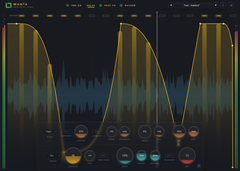
Draw one curve. Point it at anything. Build a chain of up to eight modules — volume, dirt, drive, filter, width, pan, time, pitch, loop — and give every one of them its own hand-drawn shape and its own clock.

Runs As VST3 / AU / Standalone In

Ableton
Logic
FL Studio
Reaper
Bitwig
Cubase

01 — The Chain

Build The Path

Eight slots, filled with whatever you like, in whatever order you like. Drop a filter before a drive or after it and hear the difference. Put two of the same module in one chain. The signal runs left to right, exactly as you built it.

Eight Slots

Any of the nine module types in any of the eight positions. Empty slots cost nothing — an unused slot is bypassed entirely, not run at unity.

Duplicates Welcome

Two filters, three volume gates, a drive either side of a pitch shift. Nothing stops you stacking the same module more than once.

Reorder By Drag

Pick a slot up and move it. The chain rebinds instantly and the curve you drew travels with the module, not the position.

Chain Presets

Save a whole chain — every module, every curve, every clock — as one recallable preset. 450 come built in, in banks per module and per source — drums, bass, synth, vocal — plus multi-module combinations.

02 — The Modules

Nine Ways To Move

Every module is a full effect with its own controls — not a single depth knob. Each one carries its own colour through the chain strip, the tab and the curve editor, so you always know what you are drawing.

Volume

The original Janggo, intact. Ducking, gating, tremolo and sidechain pumping from a drawn curve — single-band or split across three bands with their own shapes.

Single / Multiband · Zero-latency or linear-phase crossover

Loop

Beat repeat driven by the curve. The top of the graph is a live dead-zone that passes audio untouched; draw downward and it grabs a slice and stutters it.

1/1 → 1/64 ladder · 0–50 ms crossfade · Sync / Free

Drive

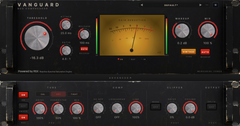
Thirteen shapers, from cubic soft clip to diode and bitcrush, with three tube transfer curves ported straight out of Vanguard. The curve sets drive per sample.

13 modes · Bias · Tone · Mix

Filter

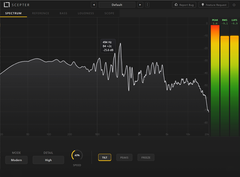
A resonant filter swept by the curve. Clean TPT state-variable or a saturating vintage ladder, each in low-, band- and high-pass, at 12 or 24 dB.

6 types · 12 / 24 dB · 20 Hz – 20 kHz

Time

The curve scans a delay line instead of a level. Sweep from dry to two seconds back and you get tape stops, rewinds, doubles and scrub effects on the grid.

0–2 s scan · Glide · Dual-head crossfade

Pitch

Granular pitch driven by the same curve, two octaves either way. Snap it to semitones for arpeggios and octave drops, or leave it smooth for dives and risers.

±24 st · Smooth / Semitone snap · Grain 20–200 ms

Dirt

A tempo-synced noise layer added on top rather than mixed in. White, pink or brown, tilted and filtered, with the curve shaping how loud it sits.

White / Pink / Brown · Colour tilt · HP + LP

Width

Mid/side width from mono to 200%, moving in time. Past 100% it can synthesise new stereo content rather than just scaling what is there — and a drum mode leaves attacks centred while only the sustain spreads.

0–200% · 4 algorithms · Bass mono 20–500 Hz · Mono-safe

Pan

The curve sweeps between two pan positions on a real pan law — or blends in a Haas delay so the far ear arrives late and the image throws wider than the speakers.

3 pan laws · Haas blend · From → To
03 — The Curve

Draw The Movement

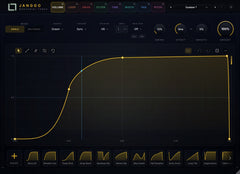
Every module gets its own editor. Add nodes, drag them, bend the tension between them, snap to the grid or draw free-hand. What you draw is what the module does, one cycle at a time, with a playhead sweeping so you can see where the beat is.

250 Shapes

A library covering pumps, ducks, gates, stutters, tremolos, sweeps and more — with families drawn specifically for width, pan, time and pitch. Save your own alongside them.

Curved Tension

Bend any segment from a hard corner to a smooth ease. Dial the exact attack and release of every dip without touching a number.

Grid Snap

Lock nodes to musical divisions for tight quantised shapes, or switch snap off for loose, hand-drawn movement that breathes.

Neutral Is Neutral

Reset any curve and it parks where the module does nothing — top for gain, centre for pan and pitch. A flat curve is a true bypass, not a subtle colour.

04 — The Clock

Every Module, Its Own Time

Each slot carries its own trigger, division, swing and offset. Run a filter on 1/4 while the loop chews 1/16 and the pan drifts over eight bars — one plug-in, several tempos, all locked to the same transport.

Six Trigger Sources

Host sync, MIDI notes, an external sidechain, the audio itself, the input transients, or free-running at your own rate. Per module, not per plug-in.

22 Divisions

From eight bars down to 1/64, with the full dotted and triplet families in between. Long evolving sweeps and ratcheting stutters come from the same menu.

Swing & Offset

MPC-style swing pushes every odd cycle late; offset nudges the whole shape in milliseconds so it sits ahead of or behind the grid.

Follow Mode

Swap the drawn curve for an envelope follower and the module tracks the incoming level instead — classic ducking, per module, without drawing a thing.

Specifications

9
Modules
8
Slots
250
Shapes
450
Presets
FormatsVST3 · AU · Standalone
PlatformsmacOS (Intel + Apple Silicon) · Windows 64-bit
Chain8 slots · 9 module types · duplicates allowed
Per moduleOwn curve · own trigger · own division · own swing
Trigger sourcesSync · MIDI · Sidechain · Audio · Input · Free
Shape library250 factory shapes + user saves
Presets450 factory presets · 297 chain + 153 volume

System Requirements macOS 11 Big Sur or later · Windows 10 or later (64-bit)
A VST3 or AU host, or run it standalone

Janggo Pro

€59,00€49,00

One licence · every future update

or try the whole thing free for 7 days

Already using Janggo? Janggo stays free, and stays exactly as it is — Pro installs alongside it as a separate plug-in, so your existing sessions keep loading the plug-in they were saved with.